
Professional Trading Platform

BSS TradingCharting Terminal

Advanced charting and trading tools built for serious traders.

  • Multi-chart workspace
  • 100+ Indicators
  • 16 Chart Types
  • Drawing Tools
  • Multiple Timeframes
  • Price Alerts
  • Custom Indicators
  • One-click trading from the chart
Download & InstallBSS Trading Charting TerminalFor Windows | Version 18.1.0

Free for life with our referral account · without one, ₹500/month

Tutorial VideosLearn the BSS Terminal step by step on YouTubeWatch Now
100% Free with Referral Account

Get lifetime access to BSS Trading Charting Terminal — FREE!

Simply open a trading account with any of our referral partners using our referral link, and you will get FREE access to BSS Trading Charting Terminal for lifetime.

Explore All Features

How to Get Free Access

Follow these simple steps to download and use BSS Trading Charting Terminal.

  1. 01

    Open a Trading Account

    Open a trading account with any of our referral partners using our referral link.

    Open an account →
  2. 02

    Download & Install

    After the account is verified, download and install BSS Trading Charting Terminal for Windows.

  3. 03

    Start Trading

    Log in to the terminal and start using all features for free — for lifetime.

  4. 04

    Lifetime Access

    Keep using BSS Trading Charting Terminal with full features at no additional cost.

No software charges Lifetime access All features included Regular updates !A valid trading account opened through our referral link is required to get free access to the terminal.
Most Popular Service · Forex Account Management

Forex MarketAccount Management

Let our professional traders manage your account.
You keep 70% of the profit.

70%Profit stays
with you
30%Our share, paid
only out of profit
₹0Monthly fee when there is no profit
(With referral account)
Risk management
with proper TP/SL
Transparent
profit sharing
Your account in
your own name
Full support
and guidance
  • Minimum investment $1,000
  • Trades with proper TP/SL
  • Professional risk management
  • Your account, your broker, your control
  • Supported only through referral accounts
  • Suitable for serious traders
LIVE Don’t just trust us — check our live results yourself.4 live MT5 accounts · Vantage & Doo Prime · read-only investor passwords shared openly See Live Results

Our Main Products & Services

Everything you need for trading, all in one place.

View All Products
Most Popular Software

BSS Trading Charting Terminal

Professional charting & trading software for Windows

FREEfor life with our referral account
  • 16 chart types & 100+ indicators
  • Up to 6 charts on one screen
  • Trade from the chart with TP / SL
  • Write your own indicators
BSS Trading Charting Terminal with six charts

No referral account? ₹500/month.

Most Popular Service

Forex Account Management

Our team trades your account — you keep 70% of the profit

70 / 30profit share · nothing to pay in a month with no profit
  • Account stays in your own name
  • Every trade with TP / SL
  • Hybrid strategy: Manual + AI + Robot
  • Live investor login to check trades
Live performanceInvestor password available — check live trades yourself

Minimum investment $1,000 · free VPS with our referral account, otherwise ₹1,000/month.

Forex Trade Copier

₹45,000 one time

Copy trades between MT4 and MT5 accounts with full control.

Buy Now

MT4 / Indian Market NSE Data

₹500 / month

Indian market data inside MT4 for charting and analysis.

Subscribe Now

Open an Account

3 referral partners

Aurum Markets, Doo Prime and Vantage — MT5 Raw ECN.

Open an Account

Custom Indicators & EAs

Quote per requirement

Indicators, Expert Advisors and robots built from your rules.

Request Quote

How It Works

A simple 4-step process to get started with account management.

See Full Process
  1. 01

    Open Your Account

    Open an eligible trading account using our referral link (in your own name).

  2. 02

    Contact Us

    After account setup, contact us on WhatsApp with your account details.

  3. 03

    We Manage Trading

    We trade according to the agreed strategy with proper risk management (TP/SL).

  4. 04

    Profit Sharing

    At the end of the period, profit is split 70% to you and 30% to us.

Risk Disclaimer: Trading involves substantial risk and may result in loss of capital. Past performance is not indicative of future results. No profit or return is guaranteed. This is not investment advice. Please read the full terms and risk disclosure before using the service.

Read Full Terms
FREE Highlight feature

Convert Your Strategy FREE of Cost

Already trading with an indicator or strategy on TradingView or MetaTrader 5? Send it to us. We rebuild it inside the BSS Trading Charting Terminal — free of cost — so you keep trading your way, on better charts.

  • Indicators
  • Strategies
  • Buy / Sell signals & alerts
  • Your own trading idea

Free for BSS Terminal users — with our referral account (free for life) or the ₹500/month plan. Send only code you own or are allowed to use. Message us on WhatsApp and we will confirm the details.

Inside the software

What BSS Trading Charting Terminal does

Nine areas, each explained with its own screenshots. Click any card to see it in detail.

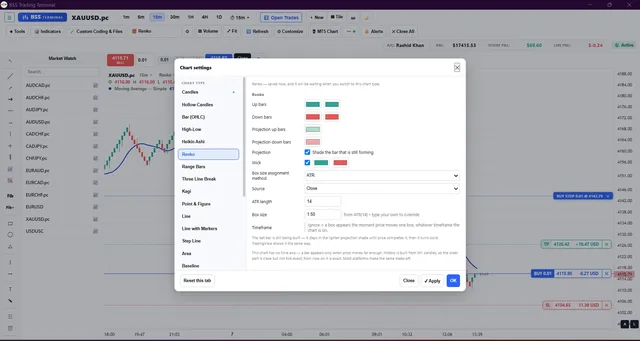
The full chart type list, with Renko box size, colours and projection settings01Charts

Sixteen chart types, one workspace

Candles, Hollow Candles, Bar (OHLC), High-Low, Heikin Ashi, Renko, Range Bars, Three Line Break, Kagi, Point & Figure, Line, Line with Markers, Step Line, Area, Baseline and Columns.

See 6 screenshots
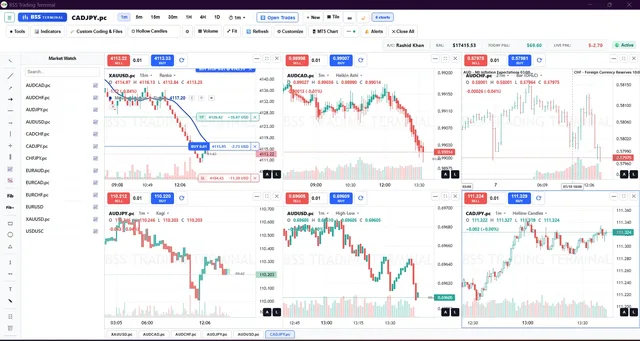
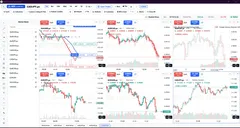
Six charts, each on a different symbol, timeframe and chart type02Multi-chart

Up to six charts on one screen

Every chart in the grid keeps its own symbol, its own timeframe, its own chart type and its own buy and sell panel.

See 4 screenshots
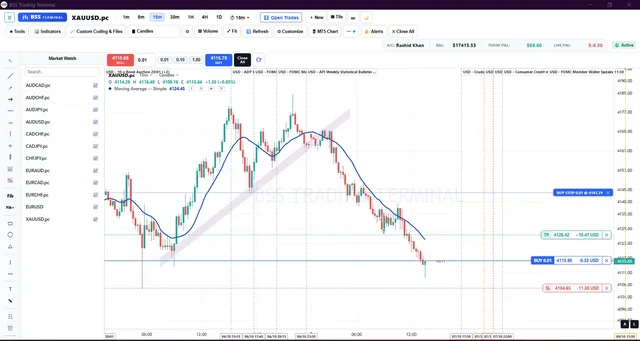
Pending order, entry, take profit and stop loss, each with live profit and loss03Trading

Trade from the chart, and keep the record

One-click buy and sell with your own lot buttons, pending orders, and entry, target and stop drawn on the chart with live profit and loss on each line.

See 4 screenshots
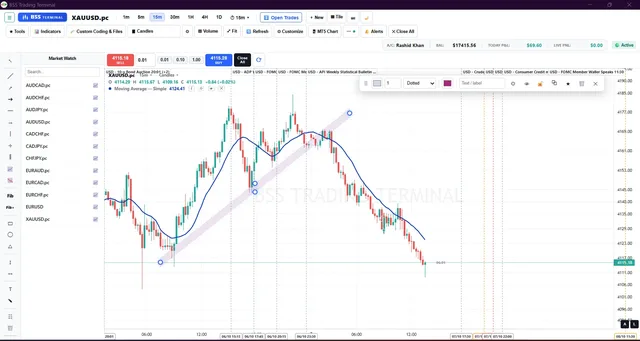
A parallel channel with its floating style bar04Drawings

Drawing tools that stay where you put them

Trend lines, rays, channels, rectangles, ellipses, triangles, Fibonacci retracement and extension, long and short position tools, text and brush.

See 5 screenshots
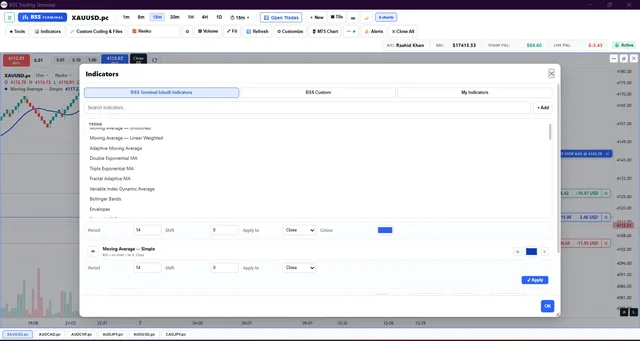
The built-in indicator library with search05Indicators

A full indicator library, and room for your own

Moving averages of every kind, Bollinger Bands, Envelopes, Parabolic SAR, RSI, ADX and the rest, all searchable.

See 3 screenshots
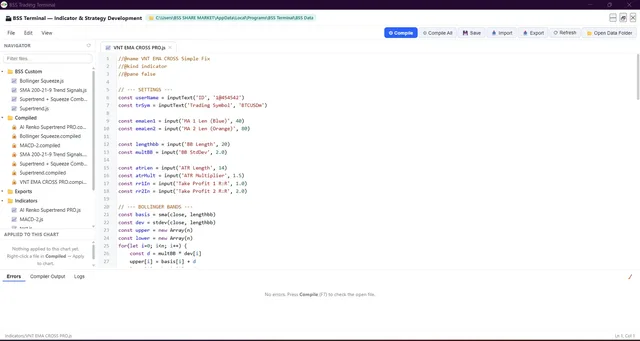
The editor with the file navigator, compiler and error list06Coding

Write your own indicators and strategies

A complete development window inside the terminal: editor, compiler, error list and your own folders.

See 6 screenshots
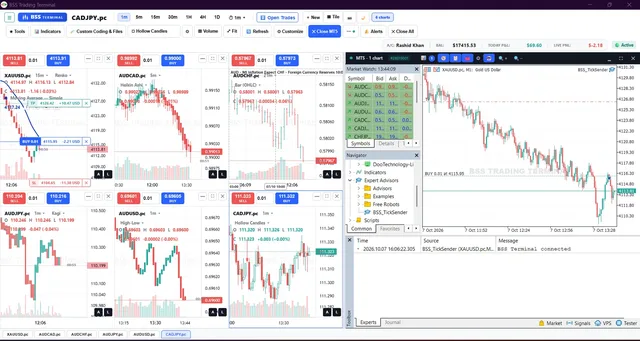
MT5 running inside the terminal, connected and reporting it in the log07MT5

MetaTrader 5 inside the terminal

The MT5 window, its Market Watch, Navigator and Toolbox, all in the same application.

See 2 screenshots
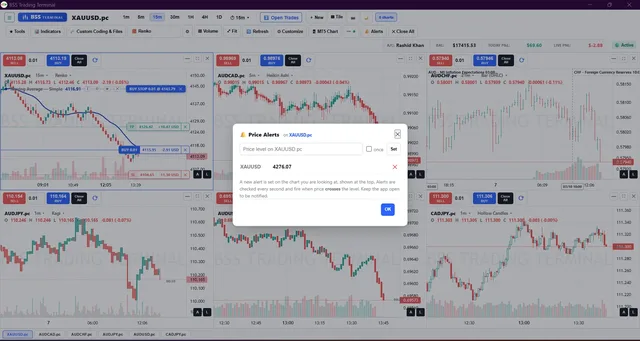
Setting a price alert, with the existing alerts listed below08Alerts

Price alerts and the economic calendar

Set an alert on any level, and see the day's events on the chart itself.

See 3 screenshots
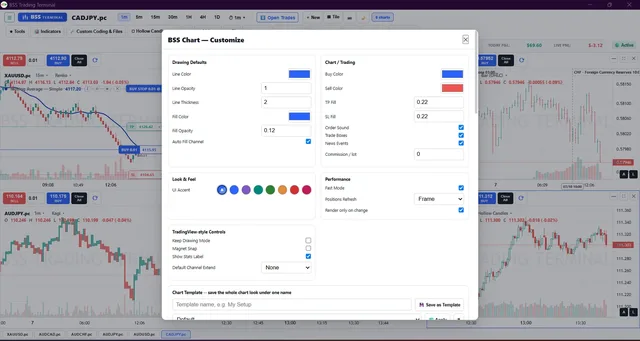
The Customize window: colours, sounds, performance and interface accent09Customize

Make it look the way you want

Almost everything on the chart can be set, saved under a name, and carried to another computer.

See 7 screenshots

Open an Account

Our partner brokers offer MT5 Raw Spread (ECN) accounts that work with the terminal. Open an account through our link and terminal access is free for life. These are referral links and we may earn a commission; the page says so plainly.

Open an account

Education

Tutorials for the BSS Terminal, the free indicators and the EAs, plus technical analysis guides. New videos go up on our YouTube channel.

Questions

What is the BSS Trading Terminal?

A charting and trading workspace for MetaTrader 5, with sixteen chart types, multi-chart layouts, indicators, drawing tools, price alerts and orders placed from the chart.

How do I get it free for life?

Open a broker account through one of our referral links on the Open an Account page, then send us the account details. We check it by hand and unlock your access. Without a referral account, access is ₹500 per month.

How does account management work?

The account is opened in your own name and your money stays with the broker. We place the trades, each with a take profit and a stop loss. Profit is split 70% to you and 30% to us. In a month with no profit there is nothing to pay us.

How is the terminal installed?

Download the installer and UltraViewer from our Download page, then send us your UltraViewer ID and password on WhatsApp. Our team connects to your PC, installs the terminal and activates your access while you watch.

Can I write my own indicators?

Yes. The terminal has a full development window inside it: write the indicator in JavaScript, press Compile, and apply it to a chart straight away.

How do I pay?

Online payment is being set up. Until then, message us on WhatsApp and we will take you through it.

Contact Us

Contact BSS Markets

Need help with our products or services? Contact BSS Markets and our team will assist you.

Phone / WhatsApp+1 343 312 7374Calls and WhatsApp messages
Emailsupport@bssmarkets.comFor detailed questions and documents
WhatsApp CommunityBSS Markets CommunityUpdates, new indicators and announcements
TelegramBSS SHARE MARKETJoin our Telegram channel

Video tutorials on our YouTube channel: @Bss_Markets

WhatsApp